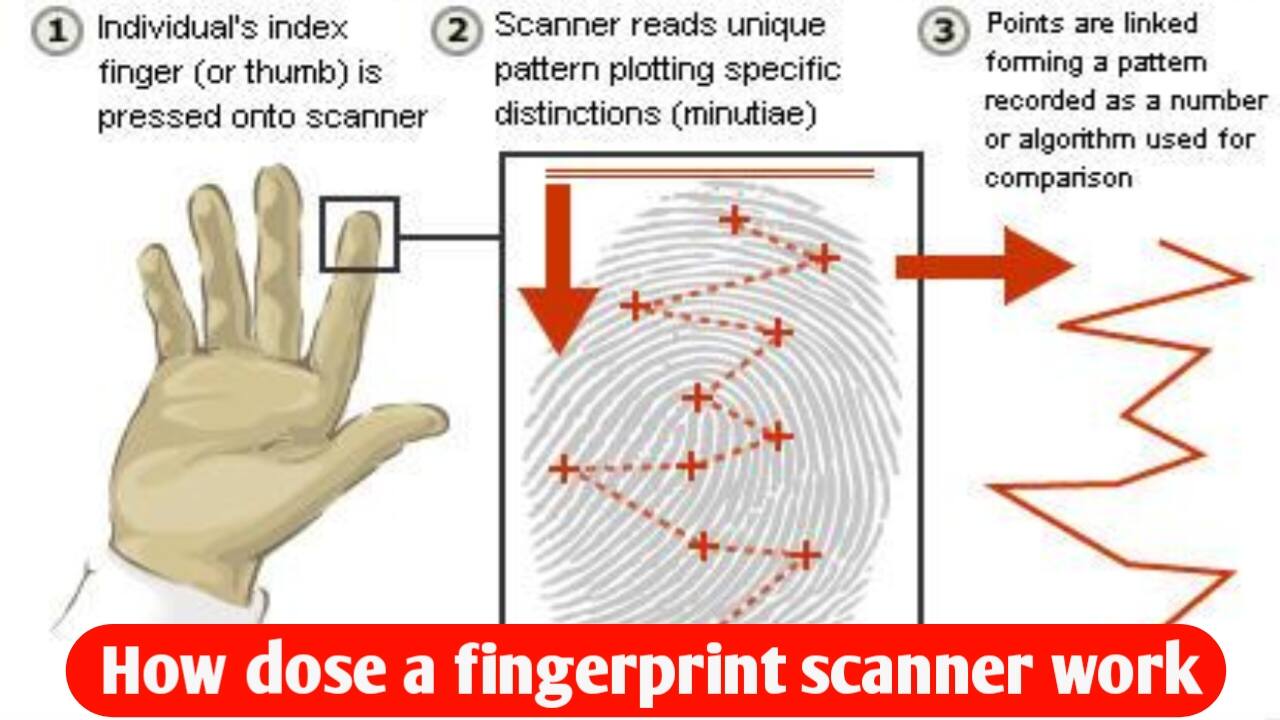
How does a fingerprint scanner work? The technology inside a smartphone.
Think about it: there are over 8 billion people in the world. Yet, when you place your finger on your mobile’s fingerprint scanner, how does the phone—in just 0.2 seconds—know that the finger belongs to you and not someone else? And more importantly, if someone were to take a photo of your fingerprint, could they unlock your phone? Does the mobile actually store an image of your fingerprint? Or is there some secret technology hidden beneath the screen that can see deep into your finger? Why does the scanner sometimes fail to work when your finger is wet or cut? And here’s another fascinating point: how do the police track down a criminal from years ago using just a tiny fingerprint? Can a phone be unlocked using the fingerprint of a deceased person? And why do identical twins have different fingerprints even though their DNA is nearly identical? Today, we’ll explore the inner workings of the biometric system hidden inside smartphones—where physics, electronics, artificial intelligence, and mathematics all converge behind a simple touch. By the end of this video, you’ll not only understand how fingerprint scanners work but also find step-by-step answers to all these questions. So, let’s uncover the secrets of this invisible security guard hidden inside your smartphone.
Why is every person’s fingerprint unique?
If you look closely at your finger, you’ll see tiny raised lines. These are known as ridges and valleys. At first glance, fingerprints might all look alike, but in reality, every person’s fingerprint is absolutely unique. Surprisingly, even the fingerprints on the two hands of the same person are not identical. Even identical twins, who share nearly the same DNA, have different fingerprints. Genetics alone is not the reason for this. When a baby is in the womb, the ridges forming on their fingers are not determined solely by genes; factors such as pressure, movement, blood flow, and minute natural changes during development also shape these patterns. This is why fingerprints serve as a unique natural identity that is extremely difficult to replicate. It is likely for this reason that police forces worldwide consider fingerprints reliable evidence of a person’s identity.
But the real question now is: how does a mobile phone actually detect these tiny lines?
What are the different types of fingerprint scanners?
How does a sensor hidden beneath the screen gather so much information from just a single touch? To understand this, we first need to look at the various types of fingerprint scanners, each relying on completely different underlying technologies. You already know that every person’s fingerprints are unique, but this is where the real engineering comes into play, because not every smartphone scans your fingerprint in the same way. Modern smartphones primarily use three types of fingerprint scanners.
1. Capacitive Scanner
The first is the capacitive scanner. This is commonly found in older smartphones or devices where the scanner is integrated into the power button. It contains thousands of microscopic electronic sensors that begin measuring minute details of your finger the moment it makes contact.
2. Optical Scanner
The second type is the optical scanner, which is commonly found in many modern smartphones with in-display scanners. When you place your finger on the screen, light is emitted from beneath the display; the sensor reads the reflection to identify your fingerprint.
3. Ultrasonic Scanner
The third and most advanced type is the ultrasonic scanner. Instead of light, it uses ultrasonic sound waves to create a detailed 3D map of your fingerprint. While the underlying technology differs, the goal for all three is the same: to scan your finger with such precision that the phone can determine—in less than a second—whether the fingerprint belongs to you or someone else.
How does a fingerprint scanner scan your finger?
But the question remains: how does the scanner collect so much information about your fingerprint from just a single touch? This is where the actual science behind fingerprint scanners comes into play. Imagine placing your finger on the scanner; the moment it touches the sensor, the scanner activates instantly. If the phone uses a capacitive scanner, thousands of microscopic sensors inside measure the electrical differences between the ridges and valleys of your fingerprint. In the case of an optical scanner, a bright light shines from beneath the screen; this light reflects off your fingerprint and reaches the sensor, allowing it to capture a clear pattern. Finally, with an ultrasonic scanner, the sensor emits high-frequency sound waves. These waves bounce off your fingerprint and return, enabling the creation of a detailed 3D structure. This entire process happens so rapidly that we perceive it as nothing more than a brief touch.
Does the phone store a photo of the fingerprint?
The answer is absolutely not. This is a major misconception. A smartphone does not save an actual image or photograph of your fingerprint. The scanner simply identifies key features—such as where lines begin or end, and where they split or merge. By combining these specific points, the phone creates a digital biometric template. This template consists solely of mathematical data, not a standard image. Consequently, even if someone were to access the stored data, they could never reconstruct an actual image of your fingerprint from it.
How does the phone recognize the fingerprint?
Now, the real magic begins. When you place your finger on the scanner again, how does the phone determine within milliseconds whether it is the same fingerprint or someone else’s? As soon as you touch the scanner, the sensor performs a new scan. The phone then compares this new scan against the previously saved biometric template. This comparison isn’t based on an image but rather on those specific fingerprint features saved during the initial registration. If the patterns in both templates match closely, the phone unlocks instantly. If they don’t match, access is denied without wasting a single second. This entire comparison happens so rapidly that it feels as though the phone recognized us the moment we touched it.
Why does the phone fail to recognize a wet or injured finger?
But there is another interesting question: why does the fingerprint scanner sometimes fail if the finger is wet, slightly cut, or covered in dirt?
Why does it sometimes fail to recognize even our own finger? The reason isn’t the fingerprint itself, but the quality of the scan. Suppose your finger is wet; water reduces the contrast between the ridges and valleys of the fingerprint, preventing the scanner from capturing a clear pattern. Similarly, excessive dust, oil, or grease on the finger can compromise sensor accuracy. Furthermore, a deep cut or peeling skin can temporarily alter the fingerprint pattern, making it difficult for the phone to match it. However, minor cuts or everyday wear and tear do not permanently change your fingerprint.
Can a phone be unlocked using a deceased person’s fingerprint?
Now, here is another intriguing question: can a phone be unlocked using the fingerprint of a deceased person? While movies often depict phones being unlocked using the finger of a dead person, the reality is not quite so simple. Older fingerprint scanners merely compared the fingerprint pattern; in contrast, many modern smartphones analyze not just the pattern but also the print’s quality, depth, and the natural electrical properties of living skin. Consequently, a matching fingerprint shape does not always guarantee the phone will unlock. Crucially, your biometric template is not stored in the phone’s standard storage; instead, it is kept in an encrypted format within a separate “Secure Enclave” or a trusted security chip. This prevents apps or hackers from directly accessing your fingerprint data.
How do the police track down a criminal using a fingerprint?
But the question remains: how do the police manage to track down a criminal using just a single fingerprint? Today, police forces and forensic experts worldwide use fingerprints to verify identities. When a fingerprint is recovered from a crime scene, its unique ridge patterns and minutiae points are compared against digital databases. Computers scan through millions of fingerprints in seconds to identify matching patterns. If a strong match is found, investigators can determine exactly whose fingerprint it is. This is why fingerprints remain one of the most reliable forms of biometric evidence—and remarkably, the same science is at work inside your smartphone every day. The only difference is that while the police search for one individual among millions of fingerprints, your smartphone is designed to recognize just one specific print.
The Technology Behind Fingerprint Scanners
The next time you unlock your smartphone using the fingerprint scanner, you will see more than just the act of placing your finger on the screen. You will understand that behind that brief touch, microscopic sensors, biometric mapping, and encrypted mathematical data work together in milliseconds to decide whether to unlock the phone. You now also know why identical twins have different fingerprints, how the police use them to catch criminals, and how your smartphone recognizes your specific finger. Just think about the immense engineering hidden behind a simple fingerprint—something we see every day. Perhaps that is why the world’s most intelligent technology often appears the simplest.
Conclusion
A fingerprint scanner may appear to be a simple feature from the outside, but it relies on the coordinated functioning of sensors, biometric mapping, electronics, and mathematical data. Instead of saving a standard photograph of your fingerprint, the phone generates a biometric template based on specific patterns and points to verify your identity. Different types of scanners—such as capacitive, optical, and ultrasonic—employ distinct technologies to recognize fingerprints. Such complex technology operates behind that brief touch, enabling the phone to decide within mere milliseconds whether or not to unlock the device.

I am the founder and content creator of SuperJankari.com, a technology-focused website dedicated to sharing useful information about smartphones, laptops, gadgets, apps, software, and the latest technology updates. My goal is to make technology easy to understand by providing clear, practical, and informative content for readers.