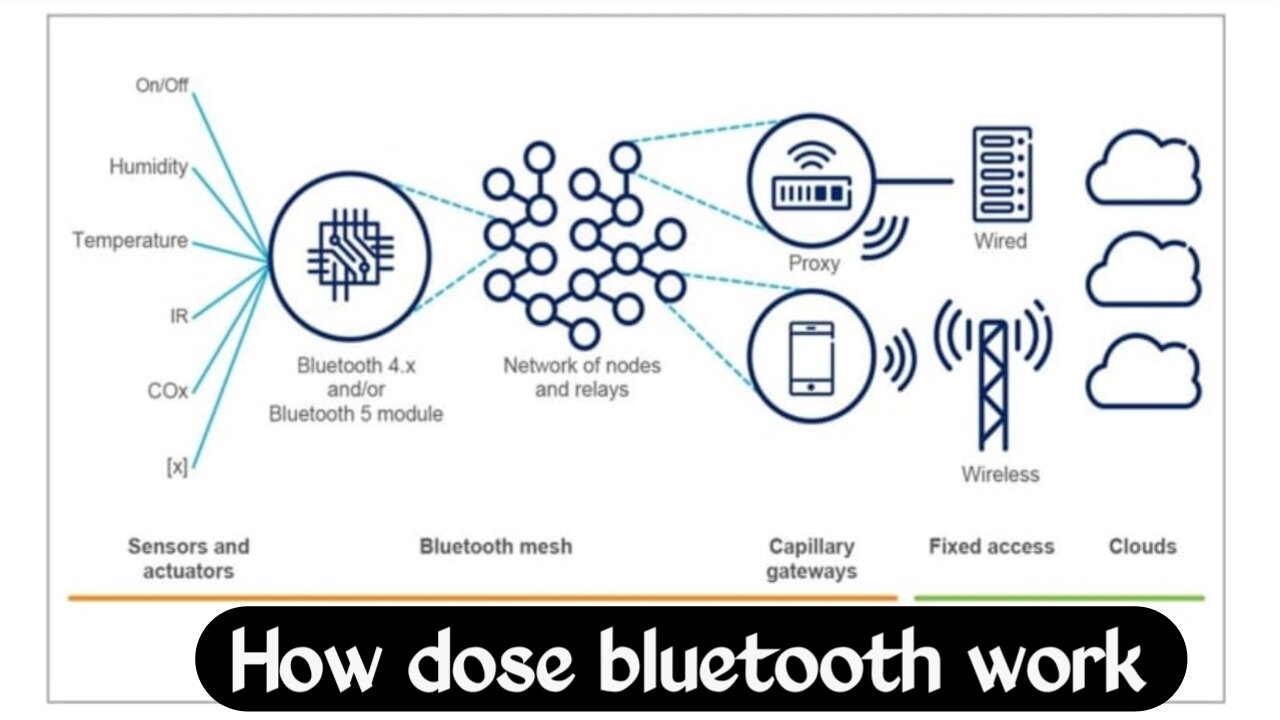
How does Bluetooth work? How does sound travel from your phone to your earbuds
Just imagine: you play a song on your phone and slip it into your pocket, and it starts transmitting sound to your earbuds without any wires. No cables, no internet, and no visible signals—yet the music reaches your ears perfectly.
But the question is, how exactly does this happen?
How does the phone transmit data through the air?
How do Bluetooth devices recognize each other?
What happens during pairing?
And the biggest question of all: if Bluetooth transmits data through the air, can anyone else intercept it?
Today, we are going to take you into the invisible world of Bluetooth—a realm where radio waves, tiny antennas, signals, frequency hopping, and communication systems work together to achieve what was once possible only with wires.
How did Bluetooth originate?
Bluetooth didn’t just appear out of nowhere. In the past, connecting devices meant dealing with a tangle of wires everywhere—separate cables for the keyboard, mouse, and headphones. Connecting multiple devices at once would turn your desk into a web of wires. As technology advanced, people sought a wireless solution that could easily connect devices over short distances while consuming minimal power. That is where the story of Bluetooth began. In the 1990s, engineers at Ericsson started working on this challenge. Their goal was simple: to create a technology that could connect small devices wirelessly. After years of research and development, a new wireless technology emerged, and from this project, Bluetooth was born.
Why was it named Bluetooth?
Now, for the most interesting question: why was it named Bluetooth?
The name “Bluetooth” was actually inspired by an ancient king named Harald Bluetooth. He is said to have united various tribes and groups. Bluetooth technology performs a similar function; it connects different devices and enables them to communicate with one another. So, the name “Bluetooth” wasn’t just chosen at random; there was a fascinating and brilliant idea behind it. Today, the technology that connects millions of devices bears the name of a king who lived a thousand years ago.
How does Bluetooth transmit data?
Now, the big question is: how exactly does Bluetooth transmit data?
You see, Bluetooth isn’t magic; it actually relies on radio waves. These are the same radio waves used by Wi-Fi, radio stations, and mobile networks. However, Bluetooth operates over a very short range and uses very low power. Bluetooth devices typically utilize the 2.4 GHz frequency band. This means your phone, speaker, earbuds, and smartwatch communicate with each other via invisible radio signals. But this raises a question: if so many devices are using the same frequency band, why don’t the signals clash with one another?
What is Bluetooth Frequency Hopping?
Why doesn’t your Bluetooth speaker accidentally connect to your neighbor’s speaker?
Especially in crowded places where numerous Bluetooth devices are present, how does the connection remain stable?
This is where Bluetooth’s true intelligence comes into play—Frequency Hopping.
Imagine a room filled with thousands of people having different conversations. What would happen if everyone started speaking on the exact same channel?
It would be total chaos; no one would be able to hear anyone else properly. Bluetooth faces a similar problem. It operates in an environment crowded with Wi-Fi, other Bluetooth devices, smart gadgets, and various wireless signals. To solve this, Bluetooth uses a technique called “frequency hopping.” Instead of staying on a single frequency, Bluetooth constantly switches frequencies—up to 1,600 times per second. Essentially, the signal jumps between small channels: staying on one channel for a few milliseconds, then immediately switching to another, then a third, and so on. Because of this, even if there is interference on one channel, the connection doesn’t drop immediately, as the system simply shifts to a different channel.
The result is reduced interference, more reliable data transfer, and a stable connection. This is why devices like your Wi-Fi, Bluetooth speaker, smartwatch, earbuds, keyboard, and mouse can all work simultaneously in your home without significantly disrupting one another.
So, how exactly does Bluetooth pairing work?
Imagine turning on your Bluetooth speaker for the first time. You scan for Bluetooth devices on your phone, spot the speaker’s name, tap “Connect,” and within seconds, the two devices are paired.
But the real question is: what happened behind the scenes?
Did pressing a single button simply turn the two devices into “friends”?
In reality, pairing is a digital introduction process. When two Bluetooth devices connect for the first time, they first verify each other’s identities—confirming that the device they are interacting with is indeed the intended one. Next, they exchange unique identifiers; think of this like two people meeting for the first time and introducing themselves. However, the process doesn’t end there. An important security step follows, where the devices generate an encryption key together. This special key secures the communication, ensuring that no third-party device can easily intercept or read the data being transmitted. With older Bluetooth devices, you often had to enter a PIN code—such as 0000, 1234, or another sequence—to verify the identity of both devices. Technology has advanced significantly since then; modern Bluetooth devices utilize far more sophisticated encryption methods. In most cases today, devices automatically generate secure keys, eliminating the need for the user to enter anything manually. This is why, when you open your earbuds’ case, they connect to your phone within seconds. There are no wires or complicated setups—just a secure digital handshake, and the connection is established. Essentially, whenever you pair a Bluetooth device, a comprehensive security process takes place in the background, completing in mere milliseconds.
How do Bluetooth devices find each other?
Imagine standing in a crowded airport. Hundreds of Bluetooth devices surround you—earbuds, smartwatches, speakers, and laptops.
Yet, how does your phone manage to identify specifically your earbuds?
How does it know exactly which device to connect to?
In reality, Bluetooth devices continuously broadcast small signals containing basic information about themselves. This process is known as “Discovery Mode.” When a device is in Discovery Mode, it signals its presence to nearby devices, indicating that it is available for connection. When you turn on Bluetooth on your phone, it begins scanning for these signals. Your phone “listens” for these broadcasts in the air and gathers information about the surrounding devices. Subsequently, the nearby devices transmit their identity details, such as device type and supported features. For instance, a device might broadcast its name (like “Boat Rockerz”), or identify itself simply as earbuds or a smart TV. This is why a complete list of devices appears on your phone’s screen within seconds. However, there is another interesting point: not every Bluetooth device remains visible at all times. Many devices are visible only during the pairing process, while others remain in “hidden mode”—meaning they are present nearby but do not broadcast their identity. This is done for security reasons to prevent unknown individuals from easily discovering and connecting to the devices. Essentially, whenever you turn on Bluetooth and search for a device, your phone is scanning for nearby Bluetooth broadcasts and using those signals to identify the correct device.
How exactly does sound travel via Bluetooth?
Now comes the most interesting part.
When you play a song, how does the music actually travel through the air?
How does the sound reach your earbuds without any wires?
Essentially, your phone first converts audio into digital data—transforming the sound of the song into a digital format of 0s and 1s. However, there is a problem here: raw audio files are very large. Sending them directly would require excessive bandwidth and power. This is where Bluetooth codecs come into play; they intelligently compress the audio data to maintain good sound quality while using less bandwidth. Next, the compressed audio is divided into small data packets—meaning the entire song isn’t sent at once but is split into thousands of tiny packets. The Bluetooth chip then converts these packets into radio signals, which travel through the air to your earbuds. That is when the earbuds take over: they receive the radio signals, collect the packets, and begin decoding them—converting the compressed digital data back into the original audio. Finally, the earbuds’ small speakers convert that data into sound waves, delivering the sound to your ears. What is truly amazing is that this entire process—data conversion, compression, packet transfer, signal transmission, reception, decoding, and sound generation—completes within just a few milliseconds. That is why it feels as though the music is traveling directly from your phone to your earbuds.
Why is there a delay in Bluetooth audio?
But this raises another interesting question.
Why do lips and audio sometimes fall out of sync while watching a video?
In other words, the lips in the video move, but the sound is heard a moment later. This happens because there is some latency involved in Bluetooth transmission. Compressing, encoding, transmitting through the air, and decoding the data—all these processes take time. However, modern Bluetooth codecs significantly reduce this delay. That is why today’s modern earbuds offer a much smoother, faster, and more synchronized audio experience compared to older ones.
What is the difference between Bluetooth and Wi-Fi?
Many people think that Bluetooth and Wi-Fi are essentially the same thing. After all, both transmit data without wires and are wireless technologies. However, their functions are quite different. Bluetooth is designed for short-range, low-power, and small-scale data transfer—specifically for devices that need to connect to each other to share limited information.
For example:
- Earbuds
- 2.Keyboards
- Mice
- Smartwatches
- Fitness bands
- Bluetooth speakers
On the other hand, Wi-Fi is designed for higher speeds and greater range. Its primary function is to handle internet connectivity and large-scale data transfers. For instance, Wi-Fi is more useful when watching YouTube videos, engaging in online gaming, or downloading large files. Another major difference lies in power consumption. Bluetooth uses very little energy, which is why devices like earbuds, smartwatches, and trackers can run on battery power for hours or even days. In contrast, Wi-Fi consumes more power to deliver higher speeds. They also differ in their connection methods; Bluetooth typically establishes a direct device-to-device connection—meaning your phone connects directly to your earbuds or speaker. Wi-Fi, however, usually operates via a router, where all devices connect to the router first before accessing the internet or network. So, while both are wireless technologies that utilize radio waves, their purposes are entirely different: Bluetooth focuses on connecting devices with low power consumption, whereas Wi-Fi focuses on providing high speeds and facilitating large data transfers. This is why both technologies coexist on your phone, each performing its own distinct function.
What is the range of Bluetooth?
Now, the question arises: how far can Bluetooth operate?
In reality, it depends on the device class. Some Bluetooth devices operate within a range of approximately 10 meters, while more powerful ones can reach up to 100 meters. However, obstacles like walls, metal objects, and interference can reduce this range. That is why audio sometimes cuts out even when your phone is in your pocket.
How secure is Bluetooth?
Now, for the most critical question.
If Bluetooth transmits data through the air, can a hacker intercept it? Technically, yes. That is why security is so important. Older Bluetooth versions had several vulnerabilities; hackers could attempt to gain unauthorized access. However, modern Bluetooth devices use encryption, meaning data is transmitted in a secure format. Nevertheless, experts advise against connecting to unknown devices in public places. Keep Bluetooth turned off when not in use, do not accept unknown pairing requests, and keep your devices updated—because as technology becomes smarter, so do hackers.
What is Bluetooth Low Energy?
Now, imagine a smartwatch that tracks your heartbeat all day long yet still runs for several days. This has been made possible by Bluetooth Low Energy, or BLE. BLE is designed specifically for low-power devices; it transmits small data packets while consuming minimal energy. This is why fitness bands, smart trackers, wireless sensors, and smart home devices can operate on battery power for extended periods.
How advanced will the future of Bluetooth be?
Bluetooth is no longer limited to just listening to music. Today, it has extended to cars, medical devices, gaming controllers, smart homes, and even industrial machinery. New Bluetooth technology is introducing features such as superior audio quality, lower latency, extended battery life, multi-device connectivity, and broadcasting capabilities. In the future, it may be possible for an entire stadium to listen to audio from a single Bluetooth signal. Smart glasses, AR devices, and AI gadgets are also likely to rely more heavily on Bluetooth.
Conclusion
So, friends, the next time you connect your earbuds, don’t view it merely as a simple wireless connection. Behind that brief moment, a complex array of technologies is at work—including radio waves, frequency hopping, digital encryption, tiny antennas, audio codecs, and ultra-fast communication systems. Your phone transmits invisible signals, the Bluetooth chip processes them, the devices establish an encrypted connection, and the entire system accomplishes in milliseconds what once required physical wires. In short, Bluetooth is not just a feature; it is a brilliant example of modern wireless technology that has made our lives largely cable-free. And that is the true beauty of technology: the things that appear simple to us often conceal truly remarkable science.

I am the founder and content creator of SuperJankari.com, a technology-focused website dedicated to sharing useful information about smartphones, laptops, gadgets, apps, software, and the latest technology updates. My goal is to make technology easy to understand by providing clear, practical, and informative content for readers.