How does a CPU work? The CPU working process explained simply.
Friends, have you ever wondered how everything happens in the blink of an eye whenever you open an app or a file on your laptop or mobile? And what exactly is the process taking place inside the CPU at that very moment?
In today’s article, we are going to decode exactly that. So, let’s get started.
What is a CPU?
The full form of CPU is Central Processing Unit. It is also known as the brain of the computer. Some people call it a Processor, while others call it a Microprocessor, but both terms mean essentially the same thing.
Any device that performs any kind of processing or calculation is equipped with a CPU. This applies whether it is a desktop computer, mobile phone, laptop, tablet, smartwatch, smart TV, automation device, gaming console, or even a network device.
However, when I say “CPU,” I am not referring to the large computer cabinet that is often mistakenly called the CPU. In reality, the CPU is a tiny chip located inside that cabinet—mounted on the motherboard—where it processes all instructions.
How exactly does a CPU work
Now, let’s discuss how the CPU works and how it processes instructions to deliver an immediate output in the blink of an eye.
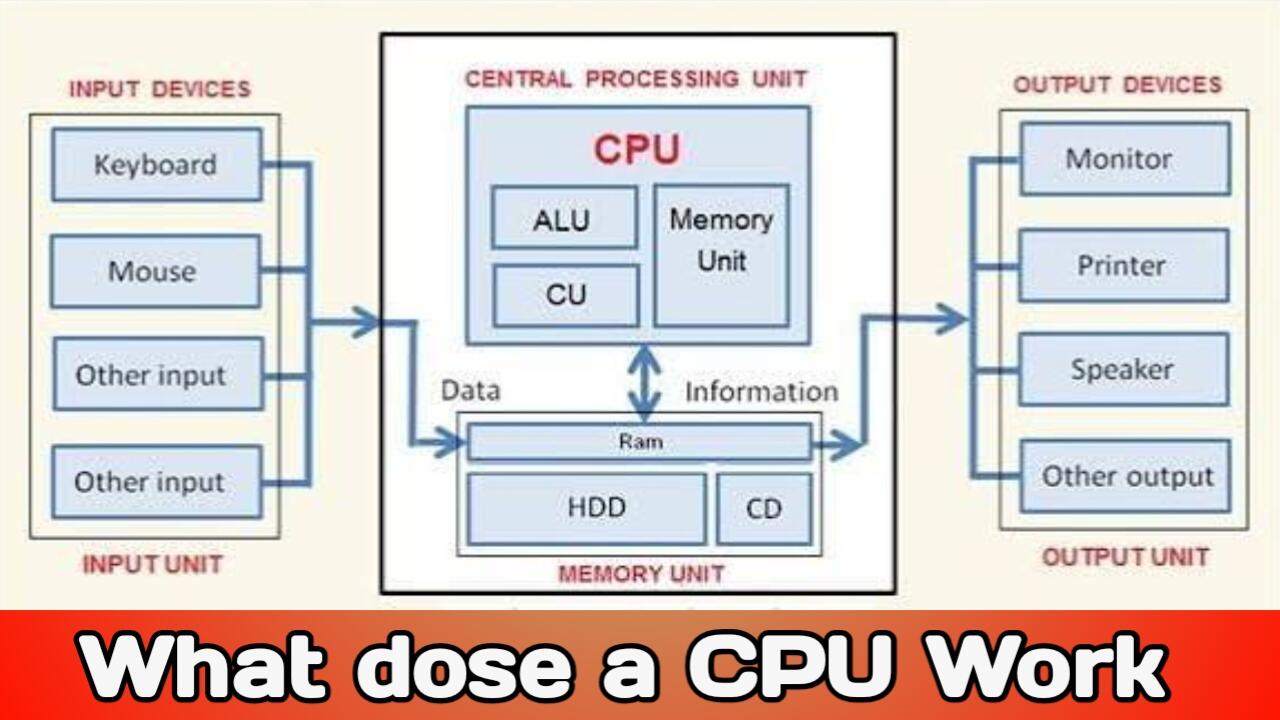
Whether it is pressing a key on the keyboard, clicking the mouse, or opening a file, the CPU handles every action through a process known as the “Basic CPU Cycle.” This cycle primarily consists of Input, Process, and Output.
Essentially, the CPU operates based on a special mechanism known as Fetch, Decode, and Execute.
1. Fetch
First, the CPU fetches an instruction from memory—meaning it retrieves the instruction and brings it in. This instruction can originate from various sources, such as your SSD, keyboard, mouse, or any other input device. The instruction first arrives in the RAM (Random Access Memory). Then, it moves from there to the cache memory so that the CPU can access it quickly. The CPU fetches these instructions one by one; that is, it picks up each command line by line.
2. Decode
Next comes the second step: Decode. In this stage, the CPU’s Control Unit interprets the instruction to understand what needs to be done—whether it involves addition, subtraction, comparison, or opening a file or program.
3. Execute
Then comes the third step: Execute. Here, the CPU’s ALU (Arithmetic Logic Unit) and other logical blocks work together to execute the instructions; essentially, the instruction is actually carried out. Once the task is complete, the result is either stored back in memory or sent to an output device like a monitor, speaker, or printer. This entire Fetch, Decode, and Execute process repeats billions of times per second, which is why the CPU delivers results for every task so rapidly.
Key Components of the CPU
To carry out this entire Fetch, Decode, and Execute process, three main components work within the CPU:
1. ALU
2. Control Unit
3. Registers
1. ALU (Arithmetic Logic Unit)
As the name suggests, the ALU is the part of the CPU that performs all mathematical and logical operations. Whether it is addition, subtraction, multiplication, decision-making, or comparison, all these tasks take place within the ALU. In other words, when the CPU needs to perform a calculation, the ALU is where the actual computation happens.
2. CU (Control Unit)
The Control Unit acts like the CPU’s traffic controller. Its job is to decode instructions and determine the CPU’s next move. It handles everything—deciding which task to perform first or later, and determining where to fetch data from and where to send it. It is the system that directs and coordinates all instructions.
3. Registers (Memory Unit)
Registers are the smallest and fastest memory units located inside the CPU. When the CPU needs to execute an instruction, temporary data is stored in these registers.
For example, suppose you type “3 + 5 = 8” into a calculator. When you press ‘3’, then ‘Plus’, and finally type ‘5’, all these numbers and operators are temporarily stored in the CPU’s registers. Then, when you press ‘Equal’, the CPU processes that data to produce the result.
In short, these three components—the ALU, CU, and registers—work together to process every instruction step-by-step, and this is what makes the CPU so powerful.
What is CPU Clock Speed
Friends, you have likely heard the term “CPU speed”—such as 3 GHz, 4 GHz, or even higher. Let’s understand what this actually means.
This refers to the CPU’s clock speed. A CPU operates at a fixed speed known as clock speed, which is measured in Hertz. Hertz indicates how many times an operation can be repeated within a single second.
So, if a CPU has a speed of 3 GHz, it means its clock frequency is 3 billion cycles per second. This implies that the fetch-decode-execute cycle is completed very rapidly, allowing the CPU to process instructions at high speed.
However, keep in mind that clock speed isn’t the only factor that matters; the CPU’s architecture and cache memory also significantly influence its actual performance.
Conclusion
So, friends, that was a simple way to understand the working principle of a CPU.
The CPU is a crucial component of a computer that processes various tasks by fetching, decoding, and executing instructions. The ALU, Control Unit, and registers work together to enable the CPU to perform its functions effectively.

I am the founder and content creator of SuperJankari.com, a technology-focused website dedicated to sharing useful information about smartphones, laptops, gadgets, apps, software, and the latest technology updates. My goal is to make technology easy to understand by providing clear, practical, and informative content for readers.