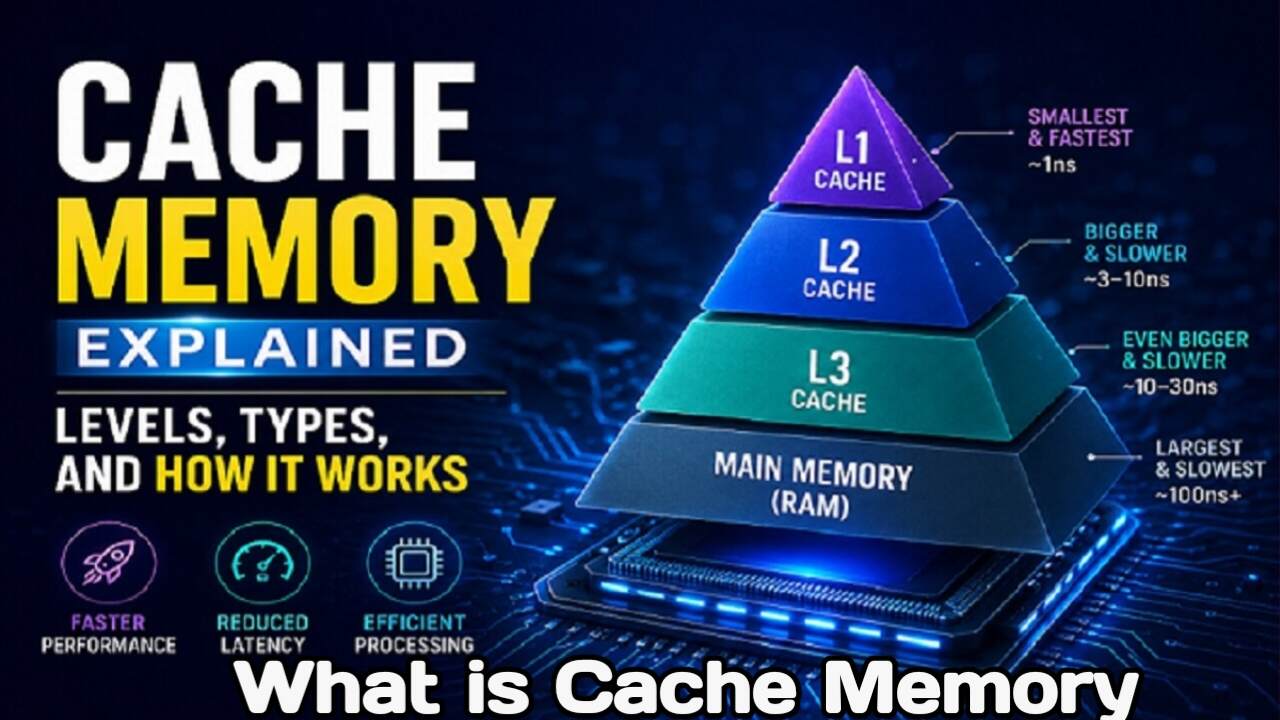
What is Cache Memory? A Complete Guide to L1, L2, and L3 Cache Memory
You have likely heard the term “cache memory” mentioned when discussing the specifications of laptops, computers, or mobile phones—specifically regarding how much cache memory a device has. But have you ever wondered what cache memory actually is and how it affects the speed of these devices? In this article, we will explore what cache memory is, understand the differences between L1, L2, and L3 cache, and see how they help boost CPU speed. We will also discuss why having a larger amount of cache memory is important for laptops, mobile phones, and desktops.
What is Cache Memory
Cache memory is an extremely fast type of memory located very close to the CPU (Central Processing Unit). Its primary function is to supply data and instructions to the CPU at high speeds, enabling the system to operate more efficiently.
Whenever the CPU needs to process data, it checks the cache memory first. If the required data is found there, it can be processed immediately. If the data is not in the cache, the CPU must retrieve it from the RAM (Random Access Memory). This process takes longer than accessing the cache, and the CPU may have to wait to receive the data. Consequently, cache memory plays a crucial role in accelerating CPU processing.
Why is having more cache memory important
Cache memory is used to ensure the CPU quickly receives the information needed to process data. The larger the cache memory, the more data it can store; this reduces the frequency with which the CPU needs to fetch data from the RAM. While cache memory is incredibly fast, it is also quite expensive. Therefore, its capacity is usually kept much smaller than that of RAM to keep the device’s cost under control.
L1, L2, and L3 Cache Memory in the CPU
Cache memory provides significant support for CPU processing. CPUs typically feature three levels of cache memory:
1. L1 Cache
2. L2 Cache
3. L3 Cache
In older CPUs, cache memory might have been a separate component, but in modern processors, L1, L2, and L3 caches are usually integrated directly into the processor itself.
What is L1 Cache
L1 cache is located closest to the CPU and is the fastest type of cache memory. It is smaller in size compared to the other cache levels, typically ranging from 32 KB to 128 KB (though sizes can vary). L1 cache is generally divided into two parts: L1 Instruction Cache (which stores instructions) and L1 Data Cache (which stores essential data). Any data or instructions required by the CPU can be retrieved very quickly from the L1 cache.
What is L2 Cache
Next is the L2 cache; it is larger than the L1 cache but operates at a slower speed. Its size can range from approximately 256 KB to 1 MB or more. Like L1, the L2 cache is located very close to the CPU and helps provide necessary data to the processor quickly.
What is L3 Cache
Next comes L3 cache. It is larger than L2 cache, and in many processors, it is shared among all CPU cores. It helps maintain better coordination regarding data and processing across the CPU cores. While L3 cache is slower than L1 and L2 caches, it is significantly faster than RAM (Random Access Memory). The size of L3 cache varies depending on the processor; in many modern processors, it can range up to several megabytes (MB).
How does cache memory work
The primary function of cache memory is to accelerate the process of making data available between the CPU and RAM. When the CPU requires specific data, it first searches for it in the cache memory.
If the data is found in the cache, the CPU can utilize it quickly; this is known as a “Cache Hit.” If the data is not found in the cache and the CPU has to retrieve it from RAM, it is called a “Cache Miss.” Thus, cache memory helps reduce the need for the CPU to repeatedly access RAM, playing a crucial role in speeding up processing.
The role of cache memory in data processing
Data processing operates according to a memory hierarchy. Data enters the system from various sources and reaches the CPU via RAM and cache memory, as required.
The CPU rapidly processes the necessary data and instructions available in the cache. The resulting output can be saved to storage or displayed to you via an output device.
Conclusion
So, you now have a clear understanding of what cache memory is and how L1, L2, and L3 caches contribute to CPU speed and processing. Cache memory serves to quickly provide the CPU with essential data, thereby reducing the frequency with which the processor needs to fetch data from RAM and enhancing the system’s overall processing performance.

I am the founder and content creator of SuperJankari.com, a technology-focused website dedicated to sharing useful information about smartphones, laptops, gadgets, apps, software, and the latest technology updates. My goal is to make technology easy to understand by providing clear, practical, and informative content for readers.